

Adhesive Wipes for CGM: What They Do and How to Use Them

what an adhesive wipe does
An adhesive wipe cleans the skin and leaves a thin, tacky layer on it, so the sensor's own adhesive and any overpatch have a better surface to grip. It doesn't replace an overpatch, and it can't save a sensor that has already been pulled loose. It's one step in a short routine: wipe on the skin, sensor on, overpatch over the top.
How a wipe helps the bond
Most early peeling comes down to what sits between your skin and the adhesive: oils, sweat, sunscreen, lotion, or leftover residue from the last sensor. A wipe clears that away and leaves a tacky film, which gives both the sensor's own adhesive and the overpatch adhesive something better to bond to. Dexcom's adhesive tips page, which summarises guidance from independent clinicians, lists skin adhesive products, some in wipe form, among the options for keeping a sensor on, and describes several as providing barrier protection. Dexcom is clear that it hasn't tested those approaches or endorsed specific ones, and that what works for one person may not work for everyone.
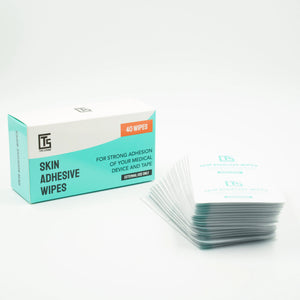
Type Strong skin adhesive wipes have two active ingredients. Isopropyl alcohol cleans the skin, and hydrogenated rosin, a tree-sap derivative, leaves the tacky surface. How much extra wear you get depends on your skin, your activity and your climate, so we don't promise a set number of days.
How to use an adhesive wipe, step by step
-
Wash and dry. Wash the area with mild soap and warm water. Skip lotions, oils and moisturiser, then dry thoroughly with a clean towel.
-
Clear sweat or sunscreen if needed. If you've been sweating or wearing sunscreen, a quick pass with an alcohol wipe helps. Let it dry fully.
-
Wipe the skin. Tear open one Type Strong skin adhesive wipe and swipe it over the dry skin where the sensor and the overpatch will sit. Let it air-dry for 10 to 15 seconds until it feels slightly tacky. Don't fan it or blow on it.
-
Apply the sensor. Put your CGM on as the manufacturer instructs.
-
Apply the overpatch. Place it over the sensor, then press and smooth the edges firmly.
Each wipe is single use. The wipes contain isopropyl alcohol, so keep them away from open flame, and stop using them straight away if your skin reacts.
Wipes with a Dexcom G7
This section covers the Dexcom G7 and the Dexcom G7 15 Day, since Dexcom's guidance applies to both. Dexcom's own tips for keeping a G7 on include a flat, clean, completely dry site that isn't where your skin folds, an area without much hair, and removing adhesive residue from previous sensors. It also says the longer you keep the sensor dry and sweat-free in the first 12 hours, the longer it may stay on.
Under the sensor
Dexcom's G7 page lists "extra adhesive" under site preparation: put additional adhesive on the patch before applying the overpatch, and let it dry. Its adhesive tips page describes liquid skin adhesive agents used alongside the sensor's own patch, with one published method: paint an empty oval on the skin, let it dry, then insert the sensor on clean skin in the centre. So there is Dexcom-published support for using a skin adhesive with a G7, but it comes with Dexcom's caveat that it hasn't tested or endorsed these approaches. If you'd like to follow the published method to the letter, wipe a ring around the insertion point rather than over it.
Under the overpatch ring
A Type Strong overpatch has a non-stick centre over the sensor, and only the outer ring touches skin. That makes the ring the part that matters: wipe a little wider than the sensor so the whole ring lands on prepped skin. Dexcom's instruction is to use the overpatch included with every G7 sensor, and our guide to Dexcom G7 overpatches covers what that means in practice. Type Strong's Dexcom G7 / ONE+ patches are cut for the G7 shape.

Wipes with a FreeStyle Libre 3 Plus
The routine is the same: wipe the skin, let it dry, apply the FreeStyle Libre 3 Plus following Abbott's instructions, then add the overpatch. The Libre 3 Plus is the same size as the Libre 3 it replaced, so Type Strong's FreeStyle Libre patches fit it.
When a wipe is worth it
You don't need a wipe at every change, but it earns its place when:
-
You're active, sweat a lot, or are about to swim
-
You live somewhere hot or humid
-
Your sensor or overpatch edges keep peeling early
-
You have oily skin
-
You're applying to a tricky spot, such as the back of the arm
Our guide to prepping your skin for patches covers the wider routine.
Who should skip wipes
Skip the wipe, or check with your care team first, if any of these apply:
-
Broken, cracked or inflamed skin. Alcohol will sting and can make it worse. Let the skin heal first.
-
Eczema or very dry, reactive skin at the site. Isopropyl alcohol can dry skin out.
-
A past adhesive allergy. The wipe's tackifier is hydrogenated rosin. Rosin, also called colophony, is a recognised contact allergen for some people. If you've reacted to adhesives before, or know you react to rosin, don't use the wipe without advice.
If redness or itching appears, our guide on how to tell if your CGM patch is causing a reaction helps you work out whether it's the wipe, the overpatch or the sensor's own adhesive. For reactive skin, our guide to CGM patches for sensitive skin is the next stop.
What a wipe cannot do
-
It doesn't replace an overpatch. The wipe preps the skin under both adhesives. The overpatch is what backs up the sensor's own adhesive.
-
It can't save a sensor that's already out. Once a sensor has been pulled loose, it's finished.
-
It can't change the sensor's own adhesive. If a reaction sits in the exact footprint of the sensor, a wipe won't fix that.

Getting wipe residue off
The tacky layer can leave a little residue behind. Type Strong's pack suggests removing leftover stickiness with an essential oil such as eucalyptus or tea tree oil if you wish, and Dexcom's G7 page also advises clearing residue from previous sensors, suggesting a body oil or adhesive remover. Wash the area with mild soap afterwards and dry it fully, since oil left on the skin works against the next sensor. Peel slowly, and see our guide to removing a CGM patch without skin damage.
Frequently asked questions
What is the best adhesive for CGM sensors?
There's no single best one. The sensor's own adhesive is the base, and the options on top are a skin adhesive wipe or liquid, an overpatch, or medical tape. Dexcom notes you may need to try several products to find what works for your skin.
How do I keep a CGM from falling off?
Start with flat, clean, completely dry skin away from folds, keep the sensor dry and sweat-free early on, wipe the skin, and add an overpatch. If a sensor does come off, it can't be saved, so the prep matters before it goes on.
Do adhesive wipes work?
They improve what the adhesives have to grip, which helps with oils, sweat and residue. They work best alongside an overpatch, not instead of one, and results vary with skin, activity and climate.
Is an adhesive wipe the same as an alcohol wipe?
No. An alcohol wipe cleans the skin. Type Strong's adhesive wipe also contains hydrogenated rosin, which leaves a tacky layer for the adhesives to bond to.
Can I use adhesive wipes on sensitive skin?
Many people do, but not on broken or inflamed skin, and not if you know you react to rosin or have had a past adhesive allergy. Stop using them straight away if a reaction appears.
How do I get adhesive wipe residue off my skin?
Use a little essential oil such as eucalyptus or tea tree oil, as Type Strong's pack suggests, then wash with mild soap and dry the skin before your next application.
Where to get Type Strong skin adhesive wipes
Type Strong skin adhesive wipes come in a box of 40, one wipe for each sensor and overpatch change, and pair with the patch that matches your device or in a patch bundle.
References
-
Dexcom. "What can I do to keep the G7 sensor from peeling off my body?" dexcom.com/en-us/faqs/what-can-i-do-to-keep-the-adhesive-patch-from-peeling-off-my-body
-
Dexcom. "How can I keep my Dexcom sensor adhered for the full sensor session?" dexcom.com/en-us/faqs/adhesive-tips
-
Messer, L.H., Beatson, C. "Preserving skin integrity with chronic device use in diabetes." Diabetes Technology & Therapeutics, 2018;20(Suppl 2).
-
Englert, K., Ruedy, K., Coffey, J., et al. "Skin and adhesive issues with continuous glucose monitors: a sticky situation." Journal of Diabetes Science and Technology, 2014;8(4):745-751.


