

Five tips & tricks to protect your Dexcom G6 sensor (+ bonus tip)

If you’ve ever had your Dexcom G6 sensor peel off halfway through its wear time, you’ll know how frustrating that can be. Whether it’s from sweat, showers, or a patch that just won’t stay flat, keeping your sensor secure can feel like a daily challenge. But a few small changes in how you prep, place, and protect your sensor can make all the difference.
Here are five simple, practical ways to keep your Dexcom G6 sensor protected — plus one bonus tip most users forget.
1. Start with clean, dry skin
The best adhesion starts before your sensor even goes on. Oils, moisturisers, or sunscreen can stop the Dexcom adhesive from gripping your skin properly. Wash the area with mild, fragrance-free soap, rinse, and make sure it’s fully dry.
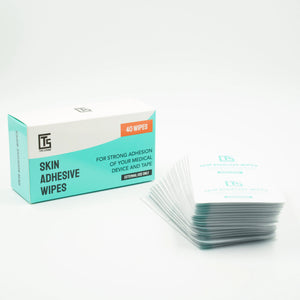
For an extra hold, use Type Strong Skin Adhesive Wipes to remove residue and prime your skin before applying the sensor. Proper prep helps your patch last the full sensor cycle and avoids the early edge-lift so many users experience.
If you need a quick guide to good application habits, see our post on proper skin prep.
2. Pick a patch that suits your lifestyle
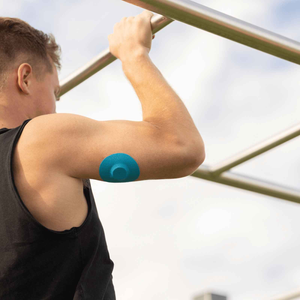
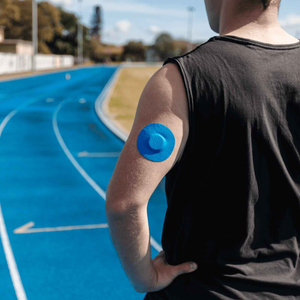
Your daily routine plays a big part in how long your patch lasts. If you work outdoors or train regularly, a waterproof patch will give better protection against sweat and humidity. If you have sensitive skin, look for hypoallergenic and latex-free materials.
Type Strong Dexcom G6 Adhesive Patches are made from breathable, medical-grade fabric designed to stay firm through movement and moisture — without the irritation.

Patch tip: For those who use multiple CGM devices in the family, our bundle option lets you mix patch types and save at the same time.
3. Choose low-friction sites
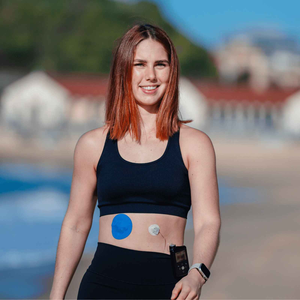
Even a strong patch can’t compete with constant rubbing. Tight waistbands, bra straps, or backpack straps can slowly lift the edges of your Dexcom G6 sensor. Rotate where you place your sensor and choose flat, low-movement areas like the upper arm or abdomen (depending on your healthcare provider’s advice).
Rotating not only protects the patch but also prevents irritation and improves comfort for long-term CGM wearers. You can learn more about managing CGM patch reactions if your skin feels tender between changes.
4. Keep your patch dry after swimming or showering
The Dexcom G6 is water-resistant, but the adhesive around it isn’t invincible. After a swim or shower, gently pat the patch dry and avoid rubbing it with a towel. If you notice any corner starting to lift, smooth it down immediately and let it dry fully.
For heavy water exposure, add a thin layer of Type Strong Tape Roll over the edges to reinforce your patch. For hot-weather tips, read our guide on CGM sensors and summer protection.
5. Watch for early edge-lift
Your patch might look fine at first, but even a small corner peeling up can let in moisture and bacteria. As soon as you see lifting, press it back down. If it doesn’t stay flat, it’s best to replace the patch instead of waiting for it to fall off.
With high-quality materials like those in Type Strong patches, most users report full 10-day wear time without needing mid-cycle changes — especially when paired with adhesive wipes or reinforcing tape.
Bonus tip: Give your skin a break
When you remove your sensor, don’t rush to place the next one in the same spot. Clean the area gently, let your skin breathe, and apply a fragrance-free moisturiser to soothe it. Allowing a short recovery period helps your skin barrier stay healthy and reduces redness or itchiness in future wear.

If you’re prone to dryness or marks, our guide on post-adhesive skin care can help you reset your skin between sensor cycles.
The takeaway
Protecting your Dexcom G6 sensor is less about luck and more about routine. A little skin prep, the right patch choice, and gentle after-care can go a long way in keeping your readings steady and your skin comfortable.
At Type Strong, we create Dexcom G6 patches and adhesive wipes that work together to support you through every step — from your first application to the final day of wear.
People also ask
How do I stop my Dexcom G6 sensor from falling off?
Use adhesive wipes before applying the patch, avoid high-friction sites, and dry your patch thoroughly after water exposure.
Can I shower with my Dexcom G6?
Yes, it’s water-resistant up to 2.4 metres for 24 hours, but water can still loosen the patch over time. A waterproof overpatch keeps it secure (Dexcom, 2025).
How long should a Dexcom G6 patch last?
With clean application and proper prep, a medical-grade overpatch typically lasts the full 10-day sensor wear time.
References
Dexcom (2025) Dexcom G6 Sensor – Water Resistance and Care Guidelines. Available at: https://www.dexcom.com/en-GB/faqs/what-should-i-know-about-dexcom-g6-water-resistance (Accessed 5 November 2025).
National Health Service (2024) Using continuous glucose monitoring (CGM). NHS UK. Available at: https://www.nhs.uk/conditions/continuous-glucose-monitoring/ (Accessed 5 November 2025).
Heller, S. & Kirkman, M. (2023) ‘Skin integrity and adhesive reactions in continuous glucose monitoring: practical guidance’, Diabetic Medicine, 40 (9), pp. 1204–1212. DOI: 10.1111/dme.15021.


