


How to Remove a CGM Patch Without Skin Damage

If you wear a continuous glucose monitor, sensor change day can sometimes bring an unexpected problem. Removing the patch should be simple, but for many people it can feel uncomfortable or leave the skin irritated.
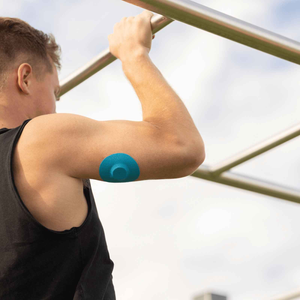
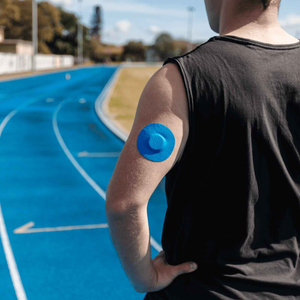
A CGM adhesive patch is designed to stay secure for days or even weeks. That strong adhesion helps keep your sensor stable during daily movement, sleep, showers, and exercise. However, the same strength that keeps the sensor in place can make removal tricky.
Some users notice redness, sticky residue, or a pulling sensation when removing their cgm adhesive patch. Over time, repeated irritation can make sensor changes stressful rather than routine.
The good news is that with the right technique and a few small adjustments, you can remove a cgm adhesive patch much more gently and protect your skin barrier at the same time.
Why CGM adhesive patches can irritate skin
A cgm adhesive patch works similarly to medical tape. It forms a strong bond with the skin so the sensor remains stable for accurate glucose readings.
However, everyone’s skin reacts differently to adhesives. Factors such as sweat, movement, skin type, and environment can influence how a cgm adhesive patch behaves.
Common removal issues include:
-
patches pulling on the skin
-
redness after removal
-
adhesive residue left behind
-
sensitivity around the sensor site
Research has shown that adhesive-related skin issues are relatively common among diabetes device users. Some studies suggest that up to 35 percent of people using insulin pumps or CGMs experience intermittent skin irritation related to device adhesives.
Reducing friction during removal helps protect the skin and makes the next cgm adhesive patch easier to wear.
Gentle techniques to remove a CGM adhesive patch
Removing a cgm adhesive patch slowly and carefully is the most effective way to reduce discomfort.

Below are techniques many diabetes educators recommend.
The fold-back method
The fold-back technique reduces tension on the skin.
Steps:
-
Lift one edge of the cgm adhesive patch with your fingernail
-
Peel the patch back slowly against itself
-
Keep the angle low rather than pulling upward
This method reduces the pulling force on the skin.
Supporting the skin while removing the patch
Another helpful method is supporting the skin while peeling.
As you remove the cgm adhesive patch, gently press your fingers against the skin beside the adhesive. Move your hand gradually along the patch as it lifts.
This reduces stress on the skin and can make removal feel significantly more comfortable.
The stretch method
Some adhesive films stretch when pulled horizontally.
With this technique:
-
stretch the cgm adhesive patch sideways
-
gently work fingers underneath the adhesive
This can allow the adhesive to release gradually instead of lifting sharply.
Products that help loosen a CGM adhesive patch
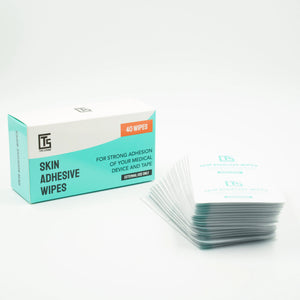
Sometimes a cgm adhesive patch simply bonds too strongly to the skin. Adhesive remover products can help dissolve the adhesive safely.
|
Removal option |
How it works |
|
Adhesive remover wipes |
Break down adhesive while you lift the patch |
|
Adhesive remover liquids |
Applied under patch edges to loosen the bond |
|
Medical adhesive sprays |
Dissolve adhesive residue |
|
Natural oils |
Coconut oil, olive oil, or baby oil may soften adhesives |
Many users prefer wipes because they allow you to gently work underneath the cgm adhesive patch during removal.
Why protecting your skin matters
Removing a cgm adhesive patch incorrectly may not seem like a big issue at first. However, repeated irritation can eventually make sensor wear more difficult.
Skin problems may include:
-
recurring redness
-
patch-shaped irritation
-
dry or sensitive skin
-
discomfort when applying the next cgm adhesive patch
Protecting the skin barrier helps ensure long-term comfort when using CGM technology.
If you want to reduce irritation before applying a new patch, it can help to understand how to prep your skin for patches the right way.
Preventing residue from a CGM adhesive patch
Sticky residue is one of the most common complaints after removing a cgm adhesive patch.

Residue occurs when part of the adhesive separates unevenly from the skin.
To remove residue safely:
-
Use an adhesive remover wipe
-
Apply a small amount of oil or adhesive remover
-
Wipe gently rather than scrubbing
Many users also find it helpful to learn how adhesive wipes improve CGM patch wear time and removal comfort.
Using skin adhesive wipes before applying a cgm adhesive patch can also improve adhesion balance and make removal easier later.
Supporting your CGM patch during wear
Sometimes removal becomes uncomfortable because the original cgm adhesive patch begins lifting before the sensor cycle ends.
When edges lift unevenly, parts of the adhesive bond become stronger than others, which can make removal harder.
Many CGM users stabilise their sensors using a cgm cover patch. A cover patch supports the original cgm adhesive patch and helps distribute movement across the sensor area.
For example:
-
active Libre users often rely on freestyle libre sensor patches to reduce lifting during daily activity.
-
pump users may add extra security with omnipod adhesive patches.
-
many CGM users also keep spare cgm patches for active lifestyles available when sensors begin to lift.
Supporting the sensor during wear can make the cgm adhesive patch easier to remove later.
Small changes make sensor changes easier
Managing diabetes often means repeating small routines every day. Removing your sensor might seem like a minor step, but doing it gently can make a significant difference to your skin comfort over time.
With the right techniques and a little preparation, removing a cgm adhesive patch can become a quick and comfortable part of your CGM routine.
Protecting your skin today helps ensure that wearing a cgm adhesive patch remains comfortable and sustainable for the long term.
References
Diabetes UK (2023) Continuous glucose monitoring. Available at:
Zhang, Y. et al. (2020) Skin complications associated with insulin pumps and CGM devices. Journal of Diabetes Science and Technology. Available at:
https://journals.sagepub.com/home/dst
U.S. Food and Drug Administration (2022) Medical adhesive related skin injury. Available at:


